Push valuable leads away in 60 seconds. Do the following:
First impressions matter. Here are the most common mistakes providers make that result in a low response rate, poor engagement, and minimal conversion to bookings:
- Don't assess them and give them feedback despite them sending you a video or photos.
- Immediately ask them for their email address or phone number, instead of engaging them where they engaged with you
- Invite them for a consultation, ignoring the fact that this is the remote consultation environment.
- Have your secretary send them a saved reply that is not personalized and ignores their journey details, treatment interests and photos
- Send them a long, tiring message asking for their entire medical history and demographics, and then inviting them to review your policies before you've given them any value whatsoever
How to Reply to New MeTime Leads and Keep Patients Engaged
When a patient connects with your clinic through MeTime, they are not a cold lead.
They have already taken action. In many cases, they have recorded a video, uploaded photos, described their concerns in their own words, selected a treatment or area of interest, downloaded the app, and chosen to connect with your clinic.
That means they are already showing strong intent.
Your first response matters. A thoughtful, prompt, and relevant reply can help the patient feel reassured and understood. A poor or generic reply can cause them to disengage quickly.
This article explains how to start the conversation properly, what to include in your first message, and what to avoid when responding to new MeTime leads.
Why your first reply is so important
Patients who use MeTime are often looking for expert advice before taking the next step. They may feel anxious, unsure, or self-conscious about the concern they have shared.
This is especially important when the enquiry relates to appearance, ageing, skin, hair, body concerns, dental concerns, surgery, or any sensitive personal topic.
By the time they reach out through MeTime, they may have already done something that feels vulnerable. They may have:
- Uploaded close-up photographs
- Recorded a video explaining their concern
- Described something they feel insecure about
- Shared personal health or appearance goals
- Taken time to choose your clinic
- Downloaded the MeTime app
- Waited for your response
Your first message should make them feel that the effort was worthwhile.
A MeTime patient is asking for a remote assessment, expert guidance, and reassurance from your clinic
The goal of your first message
The goal of your first reply is to make the patient feel:
- Seen
- Heard
- Reassured
- Understood
- Confident that they contacted the right clinic
- Clear on the next step
Your first message does not need to be long. In fact, shorter messages often work better.
A strong first reply should:
- Greet the patient warmly
- Thank them for submitting their MeTime journey
- Acknowledge what they uploaded or described
- Show that you have reviewed their photos, video, or notes
- Give an initial recommendation or assessment where possible
- Keep the conversation inside MeTime
- End with a simple question that encourages a reply
Respond promptly
Speed matters.
When a patient submits a MeTime enquiry, they are usually at a high point of interest. They have just completed the journey and are waiting to hear from you.
The longer they wait, the more likely they are to lose interest, contact another clinic, or decide not to move forward.
Best practice: respond as soon as possible after a new MeTime lead comes in. A fast, thoughtful reply can make a significant difference to patient engagement.
 Download the MeTime Providers app and turn on notifications so you can respond to new leads in seconds!
Your first response does not need to contain every detail. It simply needs to show the patient that you have seen their enquiry, understood their concern, and can guide them.
Be conversational, not clinical or robotic
Your first message should feel like it was written by a real person.
Avoid opening with a cold or overly formal response such as:
❌ "Please leave your phone number and email, or call the clinic to discuss further"
❌ "Thank you for your inquiry. Please email reception or send photos to WhatsApp"
Better example
 "Hi [First name], thanks for connecting and for submitting the video and photos. I can see the area of concern. We have a few different options for tightening the jawline and improving skin texture. Based on the photos, it looks like ultrasound skin tightening using [X treatment] and a course of laser rejuvenation with [Y treatment] would deliver nice results. I'll send some more details on these treatments"
This type of response works because it is friendly, relevant, and keeps the patient engaged.
Since this initial response is critical, let's break this down a little more.
Acknowledge what they have submitted
One of the biggest mistakes providers make is sending a generic reply that does not reference the patient’s photos, video, or concern.
Remember, the patient has taken time to show you something personal. Your reply should make it clear that you have actually reviewed it.
Use phrases such as:
- “Thanks for submitting your photos.”
- “I’ve had a look at the video you sent.”
- “I can see the area you’re referring to.”
- “Thanks for explaining what you’re hoping to improve.”
- “I can see your concern is mainly around [area].”
- “Based on the photos and what you’ve described, we may be able to help with [treatment/option].”
 Pro tip: Referencing the patient’s specific concern helps build trust quickly. It shows that your response is personal, not copied and pasted.
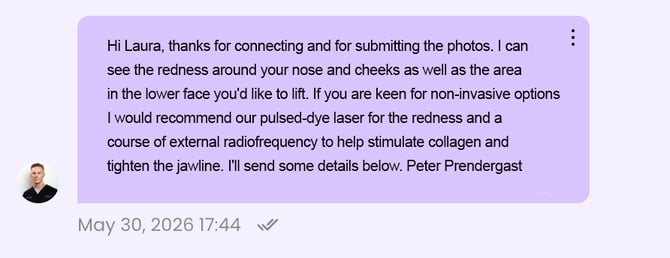
Give useful initial guidance where possible
Patients come to MeTime because they want expert advice.
Where possible, your first reply should include an initial assessment, recommendation, or explanation based on what they have submitted.
This does not need to be a final diagnosis or treatment plan. It can be a helpful starting point.
For example:
Or:
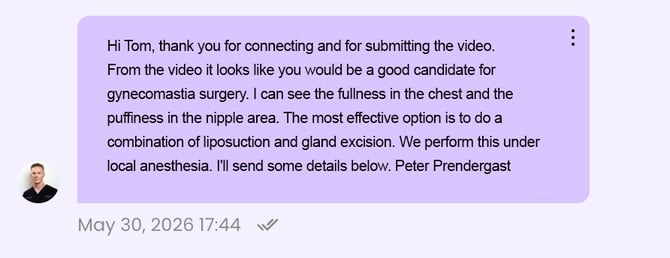
Clinical note: Only give advice that is appropriate to your professional role, clinic protocols, and scope of practice. If suitability cannot be confirmed remotely, make that clear while still giving helpful guidance.
Match your response to the patient’s selected treatment
When replying, pay attention to the treatment or area of interest the patient selected in MeTime.
If they selected a non-invasive treatment, your response should usually focus on non-invasive options first.
If they selected a surgical procedure, and it is appropriate based on what they submitted, your response can lean more towards surgical assessment, expectations, consultation requirements, recovery, or suitability.
Avoid giving a reply that feels disconnected from what the patient asked about.
 Hi, thanks for your enquiry. Please contact the clinic to book a consultation.
 Hi Sarah, thanks for sending through the video and photos. I can see from your photos and notes that your main concern is [area of concern], and you've selected [treatment selected]. given you're keen for non-surgical options, we have some excellent treatments including [treatments offered]. Let me know too if you're open to more invasive alternatives. I'll send some details below. Dr. Paul Smyth
The better example is still simple, but it shows the patient that you have reviewed their submission properly.
Keep the patient inside MeTime
This is one of the most important rules.
Do not immediately ask the patient to:
- Email the clinic
- Call reception
- Leave their phone number
- Message another platform
- Start again through another form
- Contact the clinic through a different channel
The patient has already chosen to connect with you through MeTime in order to receive a remote assessment or virtual consultation. They expect a response inside MeTime!
If your first reply sends them away to another channel, you create friction. Most patients will not follow through, and vanish.

Important:
Keep the conversation inside MeTime. The patient came to MeTime for a remote assessment and expert advice. Moving them off-channel can cause them to disengage.
It's reasonable to ask for more details like email or phone number, as well as date of birth, after the initial assessment has been completed and the patient is fully engaged and interested to proceed. The fastest way to do this is to add a saved reply to gather the information:
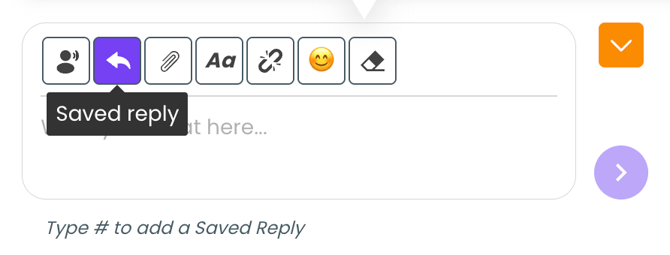
You can add a new saved reply. Call it "Phone, etc" and use the text:
Please leave your PHONE NUMBER, EMAIL ADDRESS & DATE OF BIRTH here for the system, thank you. If you do not want to receive email clinic updates (including special offers) let me know. Thanks.
When the patient has booked in for an in-clinic visit, treatment, or procedure and you need to add them to your CRM, simply tap Saved Reply, slect the one you added, and hit enter to request this information.
Avoid lengthy first responses
Ideally, the first response to the patient should be authentic, personalized, and conversational. You can follow up with saved replies as required, but in the initial message avoid being overly formal or requesting exhaustive details.
You will need to determine suitability and rule out contraindications to treatment, of course. Once the patient responds to your initial message or messages, you can quickly follow up with a saved reply--call it "Medical Hx"-- as follows:
Do you have any medical conditions, allergies or take any medications? Do you smoke or vape? Thanks.
Use saved replies carefully
Saved replies can be useful, especially when explaining treatments in more detail. And they truly save time! However, they should not replace a personal first message.
The best approach is:
- Send a short, personal first reply
- Acknowledge the patient’s concern
- Give an initial recommendation
- Ask a simple question
- Then use a saved reply if more detail is needed
Do not begin the conversation with a long saved reply that feels generic.
Personal first. Saved reply second.
Avoid asking too many questions at once
It is tempting to ask the patient everything immediately, but long lists of questions can reduce replies.
Keep the first question simple and easy to answer.
A useful first medical screening question is: Do you have any medical conditions, allergies or take any medications? Do you smoke or vape? Thanks.
You're not asking them to complete a lengthy form. Giving the patient lots of work before they have committed to proceeding with your practice is friction that reduces engagement. Forms can be completed later.
End with a question
A good MeTime reply should usually end with a question.
This encourages the patient to respond and keeps the conversation moving.
Good closing questions include:
- “Does that sound like the type of result you’re hoping for?”
- “Have you had any treatments in this area before?”
- “Are you looking for a subtle improvement or a more noticeable change?”
- “Would you prefer a non-surgical option if suitable?”
- “What are your expectations?”
- “Is there a particular area that bothers you most?”
 Pro tip: Ending with a question makes it easier for the patient to reply. Avoid ending with a statement that leaves the conversation closed.
Best practices for engaging MeTime leads
To improve patient replies and conversions, follow these best practices:
- Respond as quickly as possible
- Keep the first message short and conversational
- Thank the patient for submitting their journey
- Acknowledge their photos, video, notes, or area of concern
- Make it clear you have reviewed what they sent
- Give an initial recommendation where appropriate
- Keep the patient inside MeTime
- Avoid asking them to email, call, or move channel immediately
- End your message with a simple question
- Use saved replies after the personal first response
- Ask only the most important questions at the beginning
- Reassure anxious patients where appropriate
Common mistakes to avoid
- Sending a generic first reply
- Failing to assess them and give personalized feedback
- Ignoring their photos and video
- Moving the patient off MeTime
- Ignoring the patient's selected treatment or treatments
- Asking too many questions immediately
Quick checklist before replying to a MeTime lead
Before sending your first reply, check:
- Have you reviewed the patient’s photos, video, or transcript?
- Have you acknowledged what they submitted?
- Have you referenced their area of concern?
- Have you given useful initial guidance where possible?
- Is your message friendly and conversational?
- Is your message short enough to be easy to reply to?
- Are you keeping the patient inside MeTime?
- Have you ended with a simple question?
Summary
Patients who connect with your clinic through MeTime are high-intent. They have already taken action by sharing information, uploading photos or videos, and asking for your expert guidance.
Your first reply should be prompt, personal, and relevant.
Acknowledge what they submitted, reference their concern, give an initial recommendation where appropriate, and keep the conversation inside MeTime. Do not immediately ask them to email, call, or contact the clinic through another channel.
The better your first reply, the more likely the patient is to stay engaged and move forward.