MeTime gives patients a simple way to connect with your clinic remotely. Once you have completed onboarding, you will receive a unique MeTime link and access to your website widget.
These are two of the most important tools you have for generating leads.
MeTime is not designed to sit in the background while you wait for enquiries to appear. To get the best results, you should actively place your MeTime link and widget wherever patients already interact with your clinic.
Why this matters
Patients are often interested before they are ready to call, book, or commit. They may be browsing your Instagram, reading your emails, checking your Google Business Profile, visiting your website, or messaging you on WhatsApp.
Your MeTime link gives them a low-friction way to take the next step.
Instead of asking patients to “call us” or “send us a message,” you can guide them directly into your MeTime flow, where they can connect with your clinic remotely.
Important: The more places you share your MeTime link, the more opportunities patients have to enquire. Do not rely on one channel only.
Step 1: Add your MeTime link to every patient touchpoint
Your MeTime link should appear anywhere a patient might be deciding whether to contact you.
Use it in as many relevant places as possible, including:
- Your Instagram bio
- Instagram stories, highlights, and post captions
- WhatsApp messages
- Email templates
- Email signatures
- SMS messages
- Facebook pages and posts
- Google Ads
- Your Google Business Profile
- Reception follow-up messages
- Website buttons
- Patient reactivation campaigns
- Online directories
- Any other patient communication channel

The goal is simple: whenever a patient shows interest, they should have an easy next step.
Pro tip: If a patient has to search for how to contact you, there is a higher chance they will drop off. Your MeTime link removes that friction.
Step 2: Use a clear call to action
Avoid vague language such as:
- “Learn more”
- “Contact us”
- “Get in touch”
- “Visit our website”
Instead, use direct MeTime-focused calls to action, such as:
- “Start your online consultation”
- “Connect with us remotely”
- “Begin your patient journey”
- “Start here”
- Get expert advice, fast
Your call to action should make the next step feel easy, safe, and immediate. They are not just contacting the clinic. They are starting an actual remote consultation where they will get advice and feedback from an expert.
Step 3: Add the MeTime widget to your website
Your website is one of the most important places to display MeTime.
The MeTime website widget should be easy to see, especially on your homepage. Ideally, place it above the fold, meaning patients can see it without needing to scroll.
The widget should appear in a prominent position with a simple call to action. Remember, you can change the text on the button from your dashboard, and you can also change the color and hover color of the button widget to match your brand.
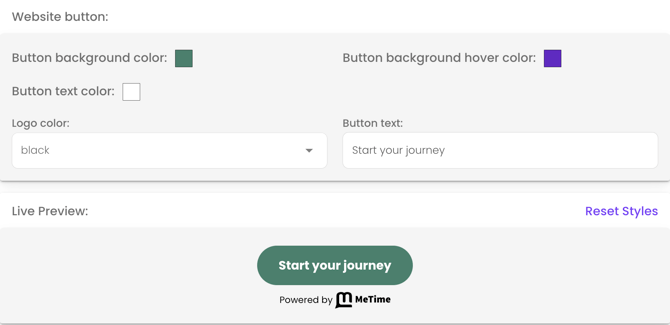
The default text is Start your journey. Ask your website manager to place the widget in a prominent place on several landing pages of your website, including the home screen. Importantly, add text around it so the patient knows what the button is all about. For example, you could add:
Free, rapid remote assessment and chat with Dr. Smith.
Safe and secure. Chat directly with our expert team
Step 4: Add MeTime to Instagram
Instagram is often one of the first places patients discover or research your clinic. Your MeTime link should be visible in your profile bio.
Example Instagram bio copy
- Free doctor consultation on MeTime
- Start with a free remote consult
- Upload a video and photos to get advice & pricing
Important: Don't just let the link in bio sit there. Direct people to the link with call-outs, add the link to stories and reels, and include it in auto replies to DMs
Example Instagram DM reply
Hi [First name], thanks for your message. the easiest way to get started is through our secure online consultation link here. [ Insert direct MeTime link]. Once submitted, our experts we'll review your journey and get back to you in the app very soon with advice and recommendations.
Don't forget you can set up an instant auto reply for Instagram DMs and in Facebook Messenger in your meta business suite under automations.
Step 5: Use MeTime in WhatsApp conversations
If your clinic uses WhatsApp to communicate with patients, this is one of the best places to share your MeTime link.
Patients who message you are already engaged. Instead of keeping the conversation informal or unstructured, guide them into MeTime. Go to your Profile tab, then Connect tab, and tap the WhatsApp icon to see the right link to send. It ends with ?source=whatsapp. Paste it into your WhatsApp replies.
Example WhatsApp message
Hi, thanks for getting in touch with [Clinic Name].
For a remote assessment, chat and personalised pricing, please connect on MeTime using this link:[Insert MeTime link]This helps our team understand what you are looking for and advise you on the most suitable next step. We'll respond on MeTime after reviewing your journey.
Step 6: Add MeTime to your email templates
Any email that goes to a prospective patient should include your MeTime link.
- A patient enquires about a procedure
- You reply the usual way, but add the following at the end:
Email template example:
"For your convenience, you can also connect directly with Dr. [Provider name] on MeTime through this special link [paste link], where [he/she] will assess your video or photos and respond to you in the app quickly
You can chat securely, get pricing and even book through the app"
👆 Use the email link: Profile tab, connect tab, tap mail icon ✉️ and then copy link.
Step 7: Add MeTime to your email signature
Your email signature is an easy place to promote MeTime without needing to rewrite every email.
Example email signature line
Start your online consultation with us here 👈 Insert your link there
Step 8: Use MeTime in Google Ads and Facebook campaigns
If you are running paid ads, your MeTime link can help convert interest into enquiries.
Instead of sending patients only to a general homepage, consider directing them to a page or action that clearly encourages them to start through MeTime.
For example:
- Google Ads campaign → home page page → MeTime widget
- Facebook ad → MeTime link
- Instagram ad → MeTime link
- Retargeting campaign → “Start your online consultation”
Paid ads work best when the next step is obvious. Make sure your ad landing page and MeTime call to action all match the same patient journey and messaging.
Step 9: Add MeTime to your Google Business Profile
Many patients find clinics through Google before visiting the website. Your Google Business Profile is therefore a key place to promote your MeTime funnel.
Where possible, add your MeTime link to relevant areas of your profile, such as your website link, appointment link, posts, or updates.
Example Google Business Profile post
Interested in starting your treatment journey with [Clinic Name]?
You can now connect with us remotely through MeTime. Start your online consultation here: [Insert MeTime Link]. Tap the Google Business Profile icon on the Connect tab to get the right link.
Step 10: Make MeTime part of your team process
MeTime works best when your whole team knows how and when to use it.
Make sure your team understands:
- What the MeTime link is
- Where to find it
- When to send it to patients
- What patients experience after tapping the link
- How to follow up with MeTime enquiries
For example, if a patient calls reception asking about a treatment, your team can say:
📞 "We can get you booked in for a consultation at the clinic. If you prefer a free remote assessment, I'll be happy to send you a link on WhatsApp, SMS, or email. Which would you prefer?"
Copy-and-paste templates
Use the examples below to start promoting MeTime immediately.
Instagram bio link
Start your secure online consultation with us now.
Instagram story
🔗 Get remote assessment
WhatsApp reply
For a free remote assessment, chat, and pricing, please connect on MeTime using this link
Email reply
For your convenience, you can also connect directly with Dr. [Provider name] on MeTime through this special link [paste link], where [he/she] will assess your video or photos and respond to you in the app quickly
You can chat securely, get pricing and even book through the app.
Email signature
Start your online consultation [here]
Google Ads call to action
Start your online consultation today
Website home screen and various landing pages
Get direct advice, fast
Dr [Provider name] we'll message you within 24 hours
[INSERT WEBSITE WIDGET BUTTON HERE, eg. Start your journey]
No commitment. Safe & secure. In-app chat & pricing.
Ask your website manager to add the widget as well as text (see above) around the widget button prominently on your home screen and other landing pages. Go to: Profile --> Connect --> Email instructions to your web manager
Best practices for getting more leads with MeTime
To get the most out of MeTime, follow these best practices:
- Share your MeTime link consistently
- Place your website widget above the fold
- Use clear calls to action
- Train your team to send the link during patient conversations
- Add the link to all email and WhatsApp templates
- Use the link in social media bios, posts, and stories
- Keep the patient journey simple
- Review your touchpoints regularly
MeTime should become part of your everyday patient communication process.
👇 Common mistakes to avoid 👇
Waiting for leads to come in automatically
MeTime gives patients the ability to connect with you remotely, but you still need to guide them there. Share your link actively.
Hiding the widget low on your website
If patients have to scroll or search for the next step, fewer people will click. Keep the widget visible and easy to access.
Using vague button text
A button that says “Learn more” is less direct than “Start your online consultation.” Be clear. Also, place text around the button to give more context (see above).
Only sharing the link once
Patients may need to see the link multiple times before taking action. Use it across different channels. This is true of all touchpoints!
Not training your team
If your team does not know when to send the MeTime link, valuable enquiries may be missed. Invest some time in this. It will pay back many times over.
Quick checklist
Before moving on, check that your MeTime link is live in the following places:
| ✅ Instagram bio |
| ✅ Website home page above the fold |
| ✅ Other website landing pages |
| ✅ Email templates |
| ✅ Email signatures |
| ✅ Facebook page |
| ✅ Google Business Profile |
| ✅ Google Ads or paid campaigns |
| ✅ reception and follow-up workflows and phone scripts |
| ✅ WhatsApp templates |
Action step: Add the first five today
Summary
MeTime helps patients connect with your clinic remotely, but the best results come when you actively promote your MeTime link.
Do not wait for leads to arrive on their own. Add your MeTime link and website widget to every relevant patient touchpoint, including your website, Instagram, WhatsApp, email templates, Google Business Profile, Facebook, and paid ads.
The easier you make it for patients to start, the more opportunities you create for new enquiries.